


If you’ve ever found yourself asking, “Does this really need to go on the intranet homepage?” — you’re not alone. Internal communicators are constantly balancing visibility with relevance. In a world where every stakeholder believes their update is urgent and homepage-worthy, even the most valuable channels can quickly become overloaded. But when everything gets promoted, nothing stands out.
Make every message count: how to choose the right internal comms channel
Make every message count: how to choose the right internal comms channel
Table of contents
- 1 Step 1: Define what your homepage is really for
- 2 Step 2: Conduct an internal communications channel audit
- 3 Step 3: Use a simple scoring rubric
- 4 Step 4: Clarify which content is actually homepage-worthy
- 5 Step 5: Ask the most powerful question in internal comms
- 6 Step 6: Use other channels intentionally
- 7 Step 7: Create a simple request process
- 8 The real goal is strategic visibility
This is one of the quiet but important roles of internal communicators. We’re not just publishing information. We’re protecting attention. When everything is “urgent,” employees eventually stop believing anything is.
That’s why many internal comms teams create a clear framework for deciding which communication channel to use — and when.
In this guide, we’ll walk through seven practical steps to help you:
- Cut through the noise without cutting off collaboration
- Choose the right internal comms channel for every message
- Set clear guidelines for what gets promoted (and why)
- Streamline stakeholder requests for placement
- Protect employee attention (and your own sanity)
We’ll also share a few practical ways AI can help speed up parts of this process — from evaluating requests to recommending channels — so you can spend less time sorting through updates and more time focusing on strategy.
Whether you’re trying to avoid homepage sprawl, keep your newsletter focused, or make smarter use of Slack and team sites, the goal is the same: move from reactive publishing to intentional communication design.
Because great internal communication isn’t about pushing everything everywhere. It’s about making every message count.

Step 1: Define what your homepage is really for
Your intranet homepage is prime real estate. Think of it as part front page, part “For You” feed, a space reserved for the most important information employees need to see right now.
Without guardrails, however, it quickly becomes a dumping ground for updates from across the organization. That’s where simple content guidelines come in. These guidelines don’t mean gatekeeping or saying no to colleagues.
It means you can ensure that the homepage consistently delivers:
- Timely information
- Broad relevance
- Clear actions employees need to take
When employees trust the homepage to surface what matters most, engagement follows.
Employees don’t experience comms the way we design it. They experience it as interruptions during an already busy day. When the homepage becomes crowded with competing updates, employees quickly learn to ignore it altogether.

Step 2: Conduct an internal communications channel audit
Start by listing every communication channel your organization uses — your intranet homepage, newsletters, Slack or Teams channels, email lists, town halls, and department sites.
Then begin with the question most teams skip: What should this channel be used for?
Define the ideal role first. What type of content belongs here? Who is the primary audience? What action should employees typically take when they see something in this space?
Next, compare that vision with reality by asking a few quick questions:
- Is the channel being used this way today?
- Who is the primary audience?
- What type of content performs best here?
- Does this overlap with another channel?
- Is the channel still serving a clear purpose?
Chances are, you’ll notice a gap between how you want your channels to work and how they’re actually being used — and that’s okay. You may also spot overlap, unclear ownership, or channels that have slowly become catch-alls for every update.
That insight is exactly what makes a channel audit valuable. It helps you realign each channel around a clear purpose and guide stakeholders toward the right place for their message.
Once you’ve reviewed your channels, define a simplified, clear role for each one:
- Homepage: High-visibility updates that affect most employees and require timely awareness
- Newsletter: Curated highlights, storytelling, and summaries employees can read when they have time
- Slack or Teams: Timely reminders, discussions, and team-level updates
- Department intranet pages: Resources, documentation, and ongoing updates for specific teams
- Manager communications: Information that benefits from context, discussion, or leadership alignment
When every channel has a defined role, employees know where to look, and stakeholders better understand where their messages belong.
AI helper: Run a quick channel audit
If you’re unsure how your channels are currently being used, AI can help analyze patterns and highlight overlap.
Example prompt: “List the communication channels our organization uses (intranet homepage, Slack channels, newsletters, team sites, email lists, etc.). For each one, suggest what its ideal purpose should be and identify where there might be overlap between channels.”
This can help you quickly spot gaps or duplication before defining each channel’s role.
Step 3: Use a simple scoring rubric
One of the easiest ways to evaluate requests objectively is to score them against a few key criteria. This creates clear parameters for channel selection, ensures high-impact messages rise to the top, and gives you the data to confidently guide stakeholders toward the right channels.
A simple 1–5 scale works well.
| Criteria | Question to Ask | Score (1-5) |
|---|---|---|
| Audience relevance | How many employees does this affect or benefit? |
1 – very few 5 – all employees |
| Business impact | Does it support company goals, compliance, or culture? |
1 – not really 5 – definitely |
| Urgency | Is there a clear timeline or deadline? |
1 – no deadline 5 – very urgent |
| Actionability | Is there a specific action employees must take? |
1 – no action required 5 – action required |
| Leadership support | Is it tied to a visible organizational priority? |
1 – not at all 5 – definitely |
Add up the scores across each category. For example, some teams set a minimum threshold (such as 15 points) before something qualifies for homepage promotion.
The exact scoring system isn’t as important as the outcome: a shared, transparent decision process. Instead of subjective judgment, you’re using consistent criteria to guide decisions.
Once you’ve evaluated a request using your scoring rubric, the next step is deciding how much visibility it actually needs.
AI helper: Evaluate requests against your rubric
AI can help you quickly review requests using your scoring criteria before making a final decision.
Example prompt: “Evaluate this internal communication request using the following criteria: audience relevance, business impact, urgency, actionability, and leadership support. Score each category from 1–5 and explain your reasoning.”
This gives you a quick starting point for assessing impact while keeping the final decision in your hands.
Step 4: Clarify which content is actually homepage-worthy
Once you’ve evaluated a request using your scoring rubric, the next step is deciding where it fits in the channel structure you’ve built.
Not every update deserves the same level of visibility — and that’s by design. Your score helps assess impact, urgency, and audience reach. Now the goal is translating that insight into the right channel decision.
As you start grouping requests by type and impact, patterns quickly emerge. Some messages clearly warrant high-visibility placement, while others are better suited for more targeted channels where they’ll reach the right audience.
In practice, most requests fall into one of three visibility levels.
Always homepage-appropriate
These updates typically warrant prime placement because they affect everyone and require attention.
Examples of essential homepage content include:
- CEO or senior leadership messages
- Emergency alerts or system outages
- Companywide policy changes
- Compliance deadlines
- All-hands announcements and recaps
- Organizational strategy updates
- Crisis communications
- Major financial or structural milestones
- New executive introductions
Sometimes homepage-appropriate
Some topics may deserve homepage visibility depending on timing or audience reach.
Examples of these topics include:
- Benefits enrollment periods
- Major product launches
- Companywide recognition program deadlines
- Mandatory training requirements
- DEI or well-being initiatives
- Employee engagement campaigns
Better suited for other channels
Other updates are valuable — just not homepage material.
Content best suited for other channels includes:
- Department-level updates
- Social events or celebrations
- Individual recognition
- Role-specific training
- Local office announcements
- ERG events
- New hire welcomes
The key idea: Visibility should match relevance. When you align messages with the right level of visibility, your channels stay focused and employees know where to look for what matters most.
Another helpful way to think about this is through the lens of attention.
You can frame messages in three simple priority buckets:
- Must know: Information everyone needs to see and understand, often requiring immediate attention or action and may have compliance, operational, or legal implications if missed
- Should know: Important updates that support awareness, alignment, or planning but aren’t urgent or immediately actionable
- Nice to know: Informational content that adds context, insights, or culture but isn’t necessary for day-to-day work
These buckets aren’t meant to replace your visibility categories. Instead, they act as a quick gut check. If something is truly must know, it likely deserves prominent placement. If it’s should know or nice to know, another channel may be a better fit.
The goal isn’t to restrict communication — it’s to protect attention and create focus so the messages that matter most actually get seen.
But even with clear categories, there will still be gray areas. That’s where one final question can help.
AI helper: Recommend the right channel
If a request falls into a gray area, AI can help suggest where it might fit best.
Example prompt: “Based on this message and its audience, recommend the most appropriate internal communication channels (homepage, newsletter, Slack, intranet site, manager cascade, etc.) and explain why.”
This can help you quickly determine whether a message warrants broad visibility or should be shared through more targeted channels.
Step 5: Ask the most powerful question in internal comms
Even with clear categories and scoring guidelines, there will still be gray areas. When you’re unsure whether something truly belongs on the homepage, one simple question can help clarify the decision:
“If an employee misses this for a week, what happens?”
The answer usually reveals the right level of visibility:
- If the result is a missed deadline, compliance issue, or inability to do their job, it likely belongs on the homepage
- If the result is a missed opportunity or helpful information, another channel may be a better fit
- If the result is that not much changes, it probably doesn’t need broad promotion
This question helps shift the conversation from opinion to impact, making it easier to guide stakeholders toward the right channel.
Step 6: Use other channels intentionally
When homepage placement isn’t the right fit, the goal isn’t to reduce visibility but to place the message where it will work best. Choosing the right internal comms channel ensures messages reach the right employee groups without adding unnecessary noise for everyone else.
Targeted communication
Use these when information applies to a specific audience rather than the entire organization.
In a modern intranet, targeted communication often lives in spaces designed for particular teams, roles, or communities. This allows messages to reach the people who need them most.
Examples of these spaces include:
- Audience-specific intranet sites or department hubs where teams share updates, resources, and announcements relevant to their work
- Manager cascades that allow leaders to add context and discuss information directly with their teams
- Slack or Teams channels dedicated to specific groups or projects
- Team newsletters or email updates focused on departmental priorities
- Departmental or team all-hands meetings where updates can be explained, discussed, and reinforced
By sharing information in the spaces where specific audiences already work and collaborate, organizations can keep communication relevant, timely, and easier for employees to act on.
Content discovery
Some information works best when employees can find it when they need it.
Examples within a modern intranet include:
- Search-optimized content so employees can quickly find policies, resources, and guidance when they need them
- Event calendars that centralize company meetings, social events, and key milestones
- Department or team feeds where updates and accomplishments are shared within the teams they’re most relevant to
- Knowledge bases or resource pages that house evergreen information employees can reference over time
These channels support content discovery, helping employees find the information they need when they need it without forcing every update to compete for attention across the entire organization.
Recognition and social connection
Some content exists primarily to celebrate people, highlight culture, and strengthen connections across the organization. Within a modern intranet, these moments often live in social or community spaces where employees naturally gather to engage with one another.
Examples of culture-building channels include:
- Employee spotlight pages or stories that highlight individual achievements and career journeys
- Photo galleries or event recaps that capture team celebrations, milestones, and company moments
- Social intranet feeds where employees can react, comment, and connect around shared experiences
- Peer recognition tools that allow employees to acknowledge one another’s contributions in real time
These channels help build culture and community — important moments that deserve visibility, but not at the expense of the most critical information employees need to see first.

Step 7: Create a simple request process
Clear guidelines work best when stakeholders understand how to submit communication requests. A short intake form helps internal comms teams gather the right information upfront and ensures requests are evaluated consistently.
Typical questions might include:
- What are you sharing? Provide a headline or short description
- Who needs to see this? All employees, specific departments, regions, managers, etc.
- What action should employees take? Register, attend, complete a task, review information, etc.
- Why does this matter? Explain the business context or impact
- When should it be shared? ASAP, by a specific date, or flexible timing
- What happens if someone misses it? Missed deadline, missed opportunity, or minimal impact
- Who is sponsoring the request? Team or leadership sponsor
- Which other channels are you planning to leverage? Slack, email, department pages, newsletters, meetings, etc.
- Other content or context worth sharing? Include additional information here
Note that this form doesn’t ask stakeholders which channels they want to use. Instead, it gathers the information you need to evaluate the request against the framework you’ve established.
This process gives you the freedom to recommend the right channels rather than simply acting as an order-taker. It’s a subtle but important script flip — one that positions you as a strategic partner and keeps you in the driver’s seat of your comms strategy.
You’ll save time while also helping stakeholders think more intentionally about how their messages should be shared.
AI helper: Improve incoming requests
If a request falls into a gray area, AI can help suggest where it might fit best.
Example prompt: “Review this internal communication request and suggest how it could be clearer, more actionable, and easier to promote internally.”
Over time, this helps stakeholders learn what strong communication requests look like, improving the quality of submissions you receive.
The real goal is strategic visibility
Choosing the right communication channel isn’t about saying no more often. It’s about saying yes with intention. When you define clear roles for your channels, evaluate requests consistently, and guide stakeholders toward the best place for their message, your communication ecosystem becomes easier for everyone to navigate.
As a result, employees know where to look for what matters, stakeholders understand how messages get promoted, and your most important channels stay focused on what truly deserves attention.
Because great internal communication isn’t about getting the most visibility. It’s reaching the right people, in the right place, at the right time.
How Simpplr can help
Simpplr gives internal comms teams the structure to act on this kind of framework. The AI-powered employee experience platform enables you to define clear roles for each channel and reinforce them through how content is published and distributed.
Targeting ensures messages reach the right audience without defaulting to the homepage. This means fewer debates about visibility and more confidence that important updates land where they should. Analytics give you visibility into what’s working across channels, which lets you refine your approach.
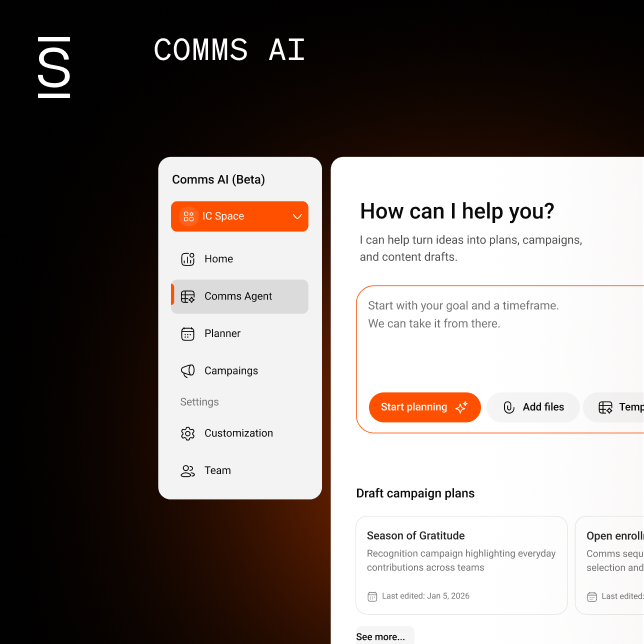
Comms AI expands your capabilities further by handling both the strategic and operational sides of execution in one connected workspace. It structures campaigns across audiences, channels, and timelines — and reveals conflicts with what’s already scheduled before you publish.
Content adapts to context automatically, so a policy update reads differently than a culture moment, and an intranet article formats differently than a Slack message. Approvals stay centralized so everyone works from the same version.
When you’re ready to publish, content goes out across the intranet, email, and Slack or Teams without reformatting the same message multiple times. The framework you’ve built for choosing the right channel is a lot easier to act on when planning, approvals, and delivery all live in the same place.
Ready to find out how Simpplr can improve your internal comms process? Request a demo today.
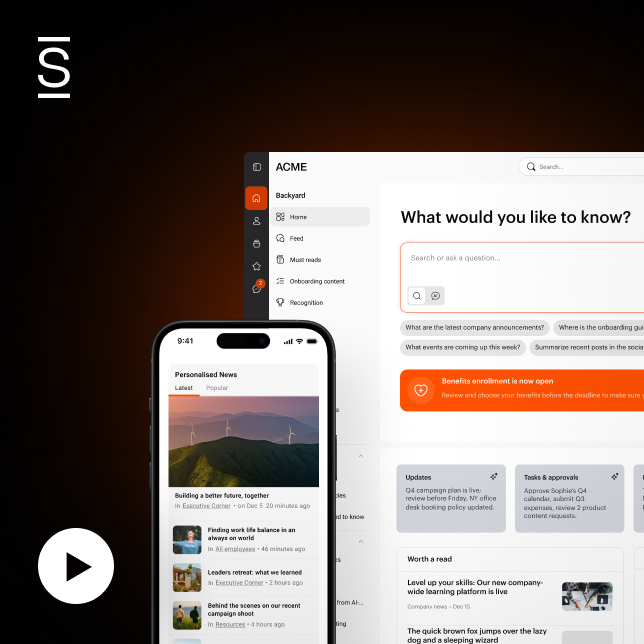
Watch a 5-minute demo
See how the Simpplr employee experience platform connects, engages and empowers your workforce.
- #1 Leader in the Gartner Magic Quadrant™
- 90%+ Employee adoption rate