








You have a vision to launch a modern intranet that helps your people thrive. Employees find what they need in seconds. Frontline workers stay connected. IT stops fielding the same questions over and over. Your executive team finally reaches everyone. Getting there is the tricky part. That’s where an intranet project plan comes in.
How to create an intranet project plan and what to include
How to create an intranet project plan and what to include
Table of contents
- 1 Understanding intranet project planning fundamentals
- 2 Essential components of your intranet project plan
- 3 Key phases of your intranet project plan
- 4 Real intranet project plan examples
- 5 Simpplr’s intranet project plan template
- 6 Best practices for intranet project planning
- 7 Ensuring long-term intranet success
- 8 How Simpplr can support your intranet project plan
Between stakeholder meetings, technical requirements, content migration, and change management, it’s easy to feel like you’re building the plane while flying it. Without a solid intranet project plan, even the best platform can become just another tool nobody uses.
A robust intranet project plan is the difference between another failed technology deployment and a platform that transforms communication, collaboration, and employee experience.
This guide breaks down how to create an intranet project plan that gets you to launch and beyond. We’ll cover the essential steps, show you what to include, and give you a downloadable intranet project plan template based on real implementations that worked.
Understanding intranet project planning fundamentals
A solid intranet project plan determines whether your platform becomes an essential daily destination or another underused system gathering digital dust.
90% of all intranet projects fail to achieve their initial goals, according to Gartner.
What makes intranet projects unique
Unlike typical software rollouts, intranet projects touch every part of your business. You’re doing more than deploying technology — you’re reshaping how employees communicate, access knowledge, and get work done.
This shift introduces unique challenges:
- User adoption can be hard. Employees won’t engage with clunky interfaces, stale content, or systems that feel like extra work.
- Stakeholder needs may conflict. IT, HR, internal communications, executives, and frontline teams all want different things.
- Integration can be complex. Your intranet needs to unify news, collaboration, knowledge, business systems, and productivity tools into one seamless experience.
Common planning mistakes to avoid
Poor planning, weak governance, and underestimating user needs are the main reasons intranet projects fail. The good news is that modern intranet platforms like Simpplr help teams avoid these traps.
Watch out for these pitfalls:
- Neglecting content migration: Legacy intranets often become digital junk drawers without a content audit and governance plan
- Weak change management: Even great tools go unused without communication, champions, and executive sponsorship
- Overlooking governance: Lack of clear ownership for content, features, and approvals leads to messy, outdated intranets
Avoiding these missteps starts with a comprehensive intranet project plan. Let’s break down what needs to be included.

Essential components of your intranet project plan
A successful intranet project plan does more than list tasks and deadlines. It creates a clear path from strategy to execution by defining the building blocks that connect business goals with employee needs.
Core planning elements
Before you choose features or set timelines, you need to establish what you’re solving, who’s responsible, and what resources you’ll need.
These elements form the foundation:
- Scope and objectives: Name the business challenges the intranet will solve, such as improved engagement, reduced IT tickets, or faster onboarding
- Stakeholder roles: Identify champions across IC, IT, HR, and executive leadership
- Technology requirements: Include integrations, AI functionality, and security/compliance needs
Getting these defined upfront reduces the risks that derail projects later, like scope creep, unclear ownership, and underestimated functionality needs.
Intranet-specific considerations
Your intranet should positively shape the daily employee experience. That means addressing content strategy, employee needs, and long-term ownership from day one.
The steps include:
- Content audit and migration strategy to prevent clutter
- User persona development to reveal employee motivators, frustrations, and success measures
- System integration mapping for HRIS, CRM, ticketing, and collaboration platforms
- Governance planning to define ownership and avoid unclear accountability
Factor these in early, and you’ll avoid the pitfalls that cause most intranet failures: outdated content, poor adoption, and platforms that don’t connect to actual workflows.
Success metrics and KPIs
An intranet isn’t truly successful unless you can prove its impact. The most effective intranet project plans balance employee outcomes with measurable business results.
These metrics include:
- Adoption: login rates, active users
- Engagement: content views, likes, shares
- Efficiency: reduced support tickets, faster onboarding
- Impact: improved retention, revenue growth, cost savings
With the right insights, you can track progress, demonstrate value to stakeholders, and continuously improve the employee experience. Once these components have been defined, you’re ready to build out the full plan phase by phase.

Key phases of your intranet project plan
A structured process ensures your intranet project plan covers critical steps without missing anything that could derail you later. These six phases take you from building the business case through launch and beyond.
Phase 0: Evaluation and business case
Before you officially kick off the project, you need to make the case for why now is the right time to invest. This phase is about gathering evidence and securing executive buy-in.
Key actions in phase 0:
- Assess current systems: Identify what’s broken, such as low adoption, outdated content, or IT bottlenecks
- Gather employee insights: Use surveys or focus groups to understand frustrations and needs
- Define strategic outcomes: Link intranet goals to engagement, productivity, or retention
- Build a business case: Use Simpplr’s internal comms business case guide to quantify impact
- Secure sponsorship: Identify executive champions for budget approval and alignment
Once you’ve secured approval and budget, it’s time to kick off the project.
Phase 1: Project kickoff
Once leadership approves the initiative, the project kickoff aligns stakeholders and sets expectations. This phase defines scope, roles, and governance to ensure shared ownership.
Key actions in phase 1:
- Draft project charter: Define purpose, scope, objectives, and success metrics
- Create stakeholder matrix: Identify everyone who will influence or be affected by the project and establish communication plans
- Build high-level timeline: Map key milestones, dependencies, and target launch date
- Identify risks: Document potential roadblocks and mitigation strategies
- Define governance framework: Establish decision-making authority, roles, and escalation paths
With your project structure in place, you’re ready for discovery.
Phase 2: Discovery
This phase aligns stakeholders and translates insights into clear requirements. Discovery is where you capture what the intranet must deliver and how it must work.
Key actions in phase 2:
- Document functional requirements: Define needs like news publishing, recognition, collaboration, and mobile access
- Define technical specifications: Determine hosting, scalability, integrations, and security requirements
- Capture UX requirements: Ensure intuitive navigation, mobile-first design, and accessibility standards
- Address security and compliance: Meet encryption, GDPR, SOC2, and data retention standards
- Prioritize features: Rank requirements based on business impact and implementation effort
These requirements become the blueprint for your design phase.
Phase 3: Design
This phase translates requirements into how your intranet will look, feel, and function.
Key actions in phase 3:
- Design site structure and navigation: Make it easy for employees to find essential information and resources
- Develop content strategy and migration plan: Define what to keep, rewrite, or retire so content stays fresh and relevant
- Establish visual identity and branding: Align with company culture and make the intranet name and look feel familiar
- Define governance framework: Set ownership rules, approval processes, and review cycles for each content type
- Validate with pilot users: Test navigation and functionality before build begins to ensure employees can find and use key features with ease
With designs validated and governance defined, you’re ready to start building.
Phase 4: Build
This is where your intranet comes to life — configuring the platform, integrating systems, and testing everything.
Key actions in phase 4:
- Configure platform settings and permissions: Ensure the right people see the right content
- Migrate and refresh content: Clean and reformat based on your audit
- Integrate business systems: Connect HRIS, IT support, and collaboration tools
- Conduct QA and user acceptance testing: Test with real employees to catch usability issues
- Prepare training materials: Create guides, videos, and FAQs for admins and content owners
- Define success planning: Set post-launch goals, metrics, and ownership processes
Once testing is complete and training materials are ready, it’s time to launch.
Phase 5: Launch
This is where planning meets execution. How you roll out your intranet determines whether you build excitement or confusion.
Key actions in phase 5:
- Choose your rollout approach: Decide whether to launch in phases or all at once tied to a company event or milestone
- Execute communications campaign: Use town halls, videos, newsletters, and leadership endorsements
- Follow your go-live checklist: Confirm integrations, content, governance roles, and analytics are ready
- Monitor the first 90 days: Track adoption metrics and gather employee feedback
- Celebrate milestones: Recognize contributors and show how the intranet makes work better
The first 90 days set the tone for long-term adoption and engagement.
Real intranet project plan examples
The following examples show how organizations of different sizes and industries applied these planning principles. Each demonstrates key decisions and measurable results.
Small business: Zembl (energy sector, 51-200 employees)
Zembl launched Zentral, a Simpplr-powered intranet, to unify knowledge and amplify recognition. Zentral became the “digital heartbeat” of the company, embedding values into everyday workflows.
Within six months, the platform delivered:
- 93% adoption rate
- 144+ recognition posts
- 150+ employee searches monthly
“At Zembl, we want to help people win, and Zentral is a key enabler in achieving just that. Zentral fosters a culture of recognition, collaboration, and support.” — Morgan Biggar, Head of People & Culture
Enterprise: Moffitt Cancer Center (healthcare, 9,900 employees)
Moffitt Cancer Center needed to align employees during rapid growth. Their plan reduced 400 SharePoint sites to 100. They launched in phases starting with nurses and researchers and embedded clear governance structures.
Key results include:
- 71% adoption at launch to 90% ongoing
- 73% of the workforce viewing content
- Platform became vital for crisis communications and culture campaigns
“With a dynamic and personalized experience, our employees now share, connect, and celebrate on MoffittNet like never before. Simpplr has become our ally in fostering a vibrant culture, allowing us to host impactful events, streamline crisis communications, and provide accessible training for our growing team.” — Katie Kyne, Director of Communications
Nonprofit: WestEd (education, 1,000 employees)
WestEd overcame resource constraints with just a three-person comms team. They designed around user experience, shut down outdated email lists, and integrated with Salesforce, Box, and Slack.
The impact was measurable:
- 90%+ weekly login rate
- Decreased IT and HR help-desk requests
- Growing affinity groups that strengthened community
“We initially selected Simpplr because of our shared vision of what an intranet should be like. What we did not realize back then is how much Simpplr would transform the way we work and collaborate.” — Yvonne Gemmell Keene, CIO
These examples prove that success comes not from company size or budget but from clear scope, focus, and governance.

Simpplr’s intranet project plan template
No two intranet projects are identical, but a solid framework saves you from starting from scratch. Our comprehensive intranet project plan toolkit follows Simpplr’s proven six-phase implementation methodology.
For each phase, you’ll find practical templates you can customize immediately — from business case builders and stakeholder matrices to launch checklists and adoption dashboards.
The intranet project plan template includes:
- Phase-by-phase templates covering all six stages from business case through launch
- Project charter with objectives and success metrics
- Stakeholder matrix with communication plans
- Timeline templates with milestones and dependencies
- Requirements checklists for functional, technical, and UX needs
- Content audit and migration tracker
- Governance framework with roles and workflows
- Go-live checklist with 35+ readiness checks
- Launch communications templates including three ready-to-customize emails
- Adoption measurement framework for 30-60-90-day tracking
You’ll also find detailed tools for risk management, system configuration, testing protocols, training resources, and post-launch optimization. These components capture scope, roles, milestones, and budget to keep stakeholders aligned and accountable throughout the project.
Customizing the intranet project plan template
The most effective plans are adapted to reflect your specific context.
When implementing the template, be sure to:
- Adapt for company size: Adjust governance complexity to match your organizational structure and approval workflows
- Tailor for industry: Ensure timelines, success metrics, and feature priorities match the needs of your business and employees
- Use familiar formats: Adapt the template structure to align with how your team tracks projects and communicates progress
With a solid template and proven examples as your foundation, you’re equipped to build a plan that works for your organization.

Best practices for intranet project planning
Strong planning gets you to launch, but these best practices ensure your intranet thrives long after go-live.
Proven planning methodologies
The right approach to planning makes your project more resilient to change and better aligned with stakeholder and employee needs.
These methods include:
- Agile vs. Waterfall: Consider how traditional waterfall methods lock you into rigid timelines that can lead to delays. Agile frameworks enable faster course corrections through sprint-based iterations.
- Design thinking integration: Map specific employee journeys like new-hire onboarding or shift handoffs. Design around real needs rather than assumptions.
- User-centered planning: Involve your CIO and IC leaders early to balance IT efficiency with comms impact. This prevents building what’s technically feasible instead of what employees need.
- Roadmap creation: Show how the platform will evolve over one to three years. This gives employees visibility, leaders insight into dependencies, and builds trust after launch.
Change management integration
Change management ensures adoption through clear communication, practical training, and real-time feedback.
Key elements include:
- Communication strategy: Launch campaigns should inspire excitement, not just notify. Use countdowns, sneak peeks, and leadership endorsements to build anticipation.
- Training programs: Provide layered training from admin deep dives to simple employee tips. Support frontline and mobile workers with on-the-go learning modules.
- Feedback loops: Implement surveys, polls, and analytics to capture sentiment in real time. Use this data to identify friction points and double down on what’s working.
These practices build excitement, reduce resistance, and give employees confidence to make the intranet part of their daily workflow.
Ensuring long-term intranet success
Launch is just the start. Sustained success depends on governance, ongoing optimization, and continuous improvement.
Plan for the long term by:
- Post-launch optimization: Use analytics to spot underused features and high-engagement content, then let data guide where you invest resources
- Governance structure setup: Assign clear ownership across IC, IT, and HR for content approval, permissions, and feature decisions
- Continuous improvement processes: Schedule quarterly reviews to align the intranet with evolving business goals and changing work patterns
By blending roadmaps, agile planning, proactive change management, and structured governance, your intranet becomes an engine for long-term employee engagement and productivity.

How Simpplr can support your intranet project plan
You now have the framework to avoid the pitfalls that derail most intranet projects. The next step is execution — and that’s where having the right implementation partner makes all the difference.
Simpplr’s implementation team has a track record of zero failed deployments. We guide you through every phase of this framework using proven methodologies and a team of specialists focused on delivering value from day one.
We handle the technical heavy lifting — platform configuration, integrations, testing, and training. You focus on what only you can do: defining priorities, securing sponsorship, and driving adoption with your employees.
Download your intranet project plan template complete with checklists and frameworks for all six implementation phases.
Ready to see how Simpplr can help you increase productivity and engagement? Request a demo today.
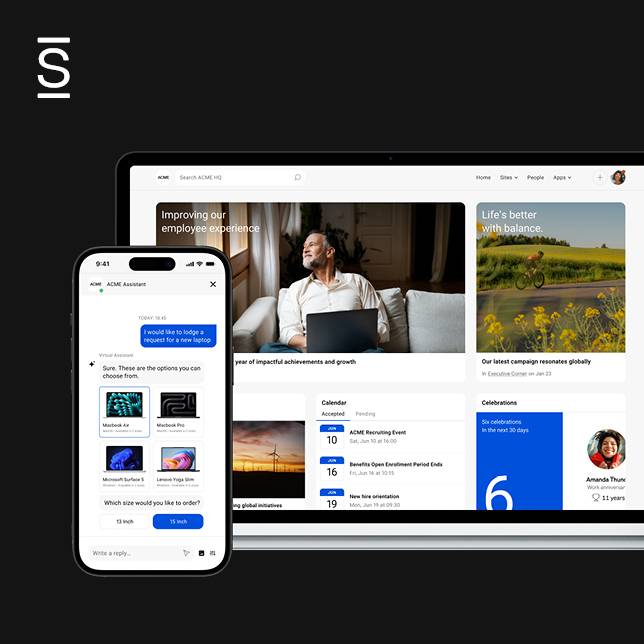
Watch a 5-minute demo
See how the Simpplr employee experience platform connects, engages and empowers your workforce.
- #1 Leader in the Gartner Magic Quadrant™
- 90%+ Employee adoption rate